
Uncategorized
Digital Billboard Truck: Boost Your Campaign with Mobile Ads
Picture this: you take the flash and spectacle of a Times Square billboard, slap it on the back of a truck, and send it wherever
So, you need to measure a TV screen. The simple answer? Grab a tape measure and run it diagonally from one top corner of the screen to the opposite bottom corner.
That’s it. That one number is the industry standard for how every TV on the market is advertised. But here's the crucial part: you only measure the screen itself—the part that lights up—not the plastic frame (the bezel) around it.
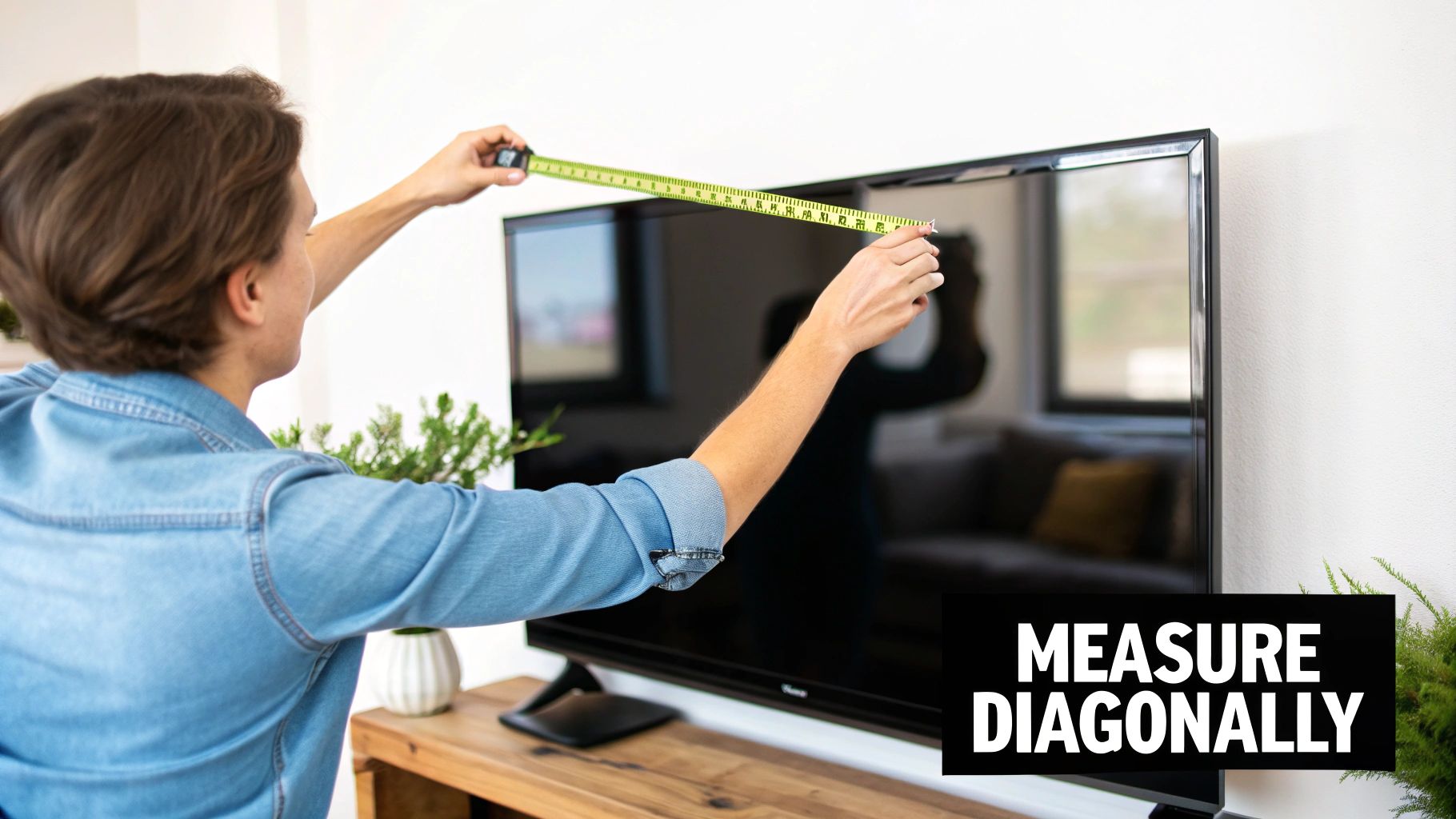
When you see a TV advertised as a 65-inch model, that number is its diagonal screen size. It might seem a little strange at first, but this practice has deep roots in the history of television manufacturing, going all the way back to the bulky cathode ray tube (CRT) sets of the 1930s and 1940s.
Back then, screen size was defined by the diameter of the circular picture tube inside. As screens became rectangular, the diagonal measurement stuck around because it was the most consistent way to represent the total viewing area. You can find more on this history at widescreen.org.
Even with today’s razor-thin LED and OLED displays, the diagonal measurement is still incredibly useful. It gives us a single, universal number for comparing different models and brands.
A 75-inch screen from one company will give you the same fundamental screen real estate as a 75-inch screen from another, even if their bezel thicknesses are slightly different. This consistency helps you make a good choice, but it's only the first step. Knowing the diagonal size is great, but it won't tell you the TV's actual width and height—and you absolutely need those numbers to know if it will fit your space.
For a quick reference, here's a simple table to guide you through the process.
| Step | Action | Key Tip |
|---|---|---|
| 1. Get Your Tool | Grab a flexible tape measure. | A soft tailor's tape can be helpful to avoid scratching the screen. |
| 2. Measure Diagonally | Place one end at the top-left corner of the viewable screen and extend it to the bottom-right corner. | Do not include the frame (bezel) in your measurement. |
| 3. Read the Measurement | Note the number in inches. This is the TV's advertised size. | Round to the nearest whole number (e.g., 64.5 inches is a 65-inch TV). |
Following these steps will give you the correct advertised size, which is the perfect starting point for all other planning.
Plenty of people make simple mistakes when sizing up their TV. Getting it right from the start will save you a world of headaches down the road.
The most important takeaway is to ignore the plastic or metal frame entirely. Start your measurement at the very edge of the picture and end it at the diagonally opposite edge. This is the only way to capture the true, usable screen size.
This same principle of precision applies everywhere, whether you're setting up a home theater or planning a much larger installation. For example, getting dimensions right is critical for commercial displays, a topic we cover in our guides on LED signs for businesses. Nailing the initial measurement is the key to a successful setup, every single time.
So you’ve got the diagonal measurement. That's a great start, but it's only one piece of the puzzle. That single number—let's say 65 inches—won't tell you how a TV will actually look on your wall or fit inside your entertainment center. The missing ingredient here is the aspect ratio.
For pretty much any modern TV you'll buy, the aspect ratio is 16:9. All this means is that for every 16 inches of width, the screen has 9 inches of height. This widescreen format has become the universal standard for everything from Netflix streams to the latest PlayStation games.
Understanding this ratio is what lets you translate that flashy diagonal number into the dimensions that really matter: the screen's actual width and height.
Don't worry, you don't need to dust off your high school geometry textbook to figure this out. Since the 16:9 ratio is so consistent, there are predictable conversions you can use as a trusty guide.
Let's take a popular 65-inch TV as a real-world example. It's sold as a 65-inch screen, but its practical, fit-in-your-living-room dimensions are:
These are the numbers you need when you’re measuring your space. They tell you if the TV will hang over the edges of your media console or be too tall to fit under a mantelpiece. Without them, you're just guessing.
The diagonal measurement sells the TV, but the width and height determine if it actually fits. Always convert the diagonal size into these two critical dimensions before you even think about buying.
The move to a 16:9 aspect ratio wasn't just a random decision; it was all about making the viewing experience better. For decades, old-school tube TVs had a boxier 4:3 ratio. That started to change back in the 1950s when movie theaters introduced widescreen formats to create a more immersive, epic feel.
The 16:9 standard was eventually adopted for HDTVs because it hit the sweet spot—it was the perfect compromise between the old 4:3 TV format and even wider cinema screens. You can learn more about the whole history of display standards and their evolution. This shift is what brought that cinematic feel right into our living rooms.
Okay, so how does this help you in a practical sense? Before you start shopping, figure out your ideal diagonal size and then look up its approximate width and height. Keep these two numbers on your phone or a sticky note.
Picture this scenario: You've got a gorgeous built-in wall unit, but the opening is only 60 inches wide. You spot an amazing deal on a 70-inch TV. A quick search shows that a 70-inch TV is roughly 61 inches wide. That single inch means it's a no-go. It simply won't fit.
This tiny bit of prep work takes seconds but saves you from the massive headache of buying a TV that’s too big for your space. It shifts your approach from hopeful guesswork to confident, informed planning.
The diagonal measurement is a great starting point—it’s the number you see on the box—but it won't tell you if the TV will actually fit in your space. For that, you need the TV's complete physical dimensions, which means accounting for the frame, or bezel, that surrounds the screen.
Even though modern bezels are incredibly thin, they add crucial fractions of an inch. Those tiny additions can be the difference between a clean, professional installation and a frustrating trip back to the store.
To get the TV's real-world footprint, you just need two quick measurements: the full width and the full height.
Grab your tape measure. Run it horizontally from the absolute outer edge of the frame on the left all the way to the outer edge on the right. Now do the same thing vertically, measuring from the very top edge of the frame to the very bottom.
These two numbers—the total width and total height—are your golden ticket. They tell you exactly how much real estate the television will occupy, whether you're mounting it on a wall or setting it in a media center. No more guesswork.
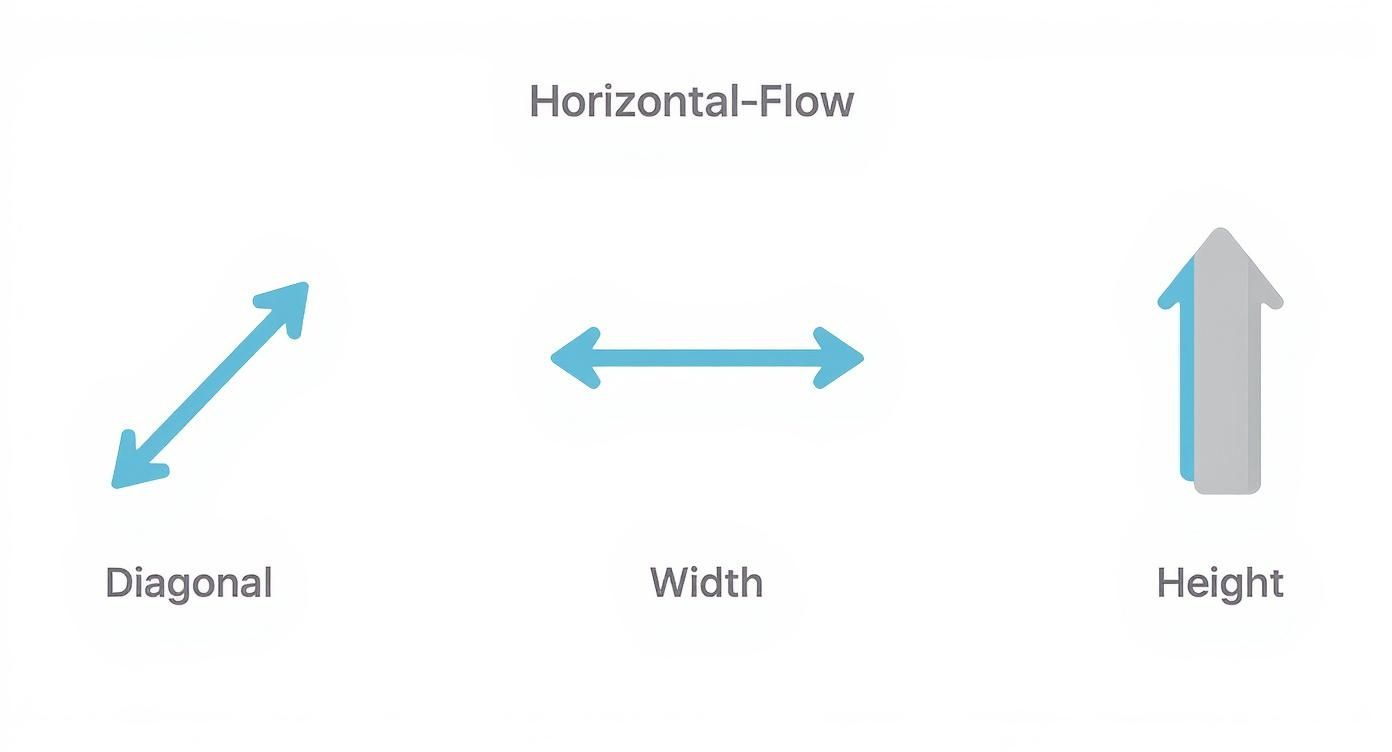
This diagram helps visualize how the three key measurements relate to one another. Once you understand this relationship, you can easily translate the marketing number (the diagonal) into the practical dimensions you need for a smooth installation (width and height).
Planning to hang your TV on the wall? There's another critical set of measurements you can't ignore, and they're on the back of the unit. You'll see four screw holes arranged in a square or rectangle. This is the VESA pattern, a universal standard that ensures your TV and wall mount will play nice together.
Getting this measurement wrong is a showstopper. A mount with the wrong VESA pattern simply will not attach to your TV. Period.
To measure it, you need just two numbers:
The final measurement is always expressed as "horizontal x vertical." So, if you measure 400mm across and 200mm down, your TV has a 400×200 VESA pattern. This is the exact number you'll need when shopping for a compatible wall mount.
Think of the VESA pattern as the common language that TVs and wall mounts use to communicate. A mismatch is like trying to fit a square peg in a round hole—it won’t work, and you risk damaging your brand-new TV.
Precision is everything, whether you're setting up a TV at home or installing a massive commercial display. For business owners, knowing the exact physical footprint of a screen is fundamental. If you're tackling a more advanced project, our guide on how to buy an LED sign offers a deeper dive into the planning process for large-scale digital displays, but the core principles of accurate measurement never change.
Here’s a real-world scenario: You had a media cabinet custom-built with an alcove that's exactly 58 inches wide. You pick up a 65-inch TV, which has a screen width of around 56.7 inches. Sounds perfect, right?
But wait. Once you add the half-inch bezel on each side, the TV's total width balloons to 57.7 inches. Now you're left with less than a quarter-inch of clearance on each side. Not only is that a nightmare for installation, but it’s also terrible for ventilation, which can shorten the life of your TV.
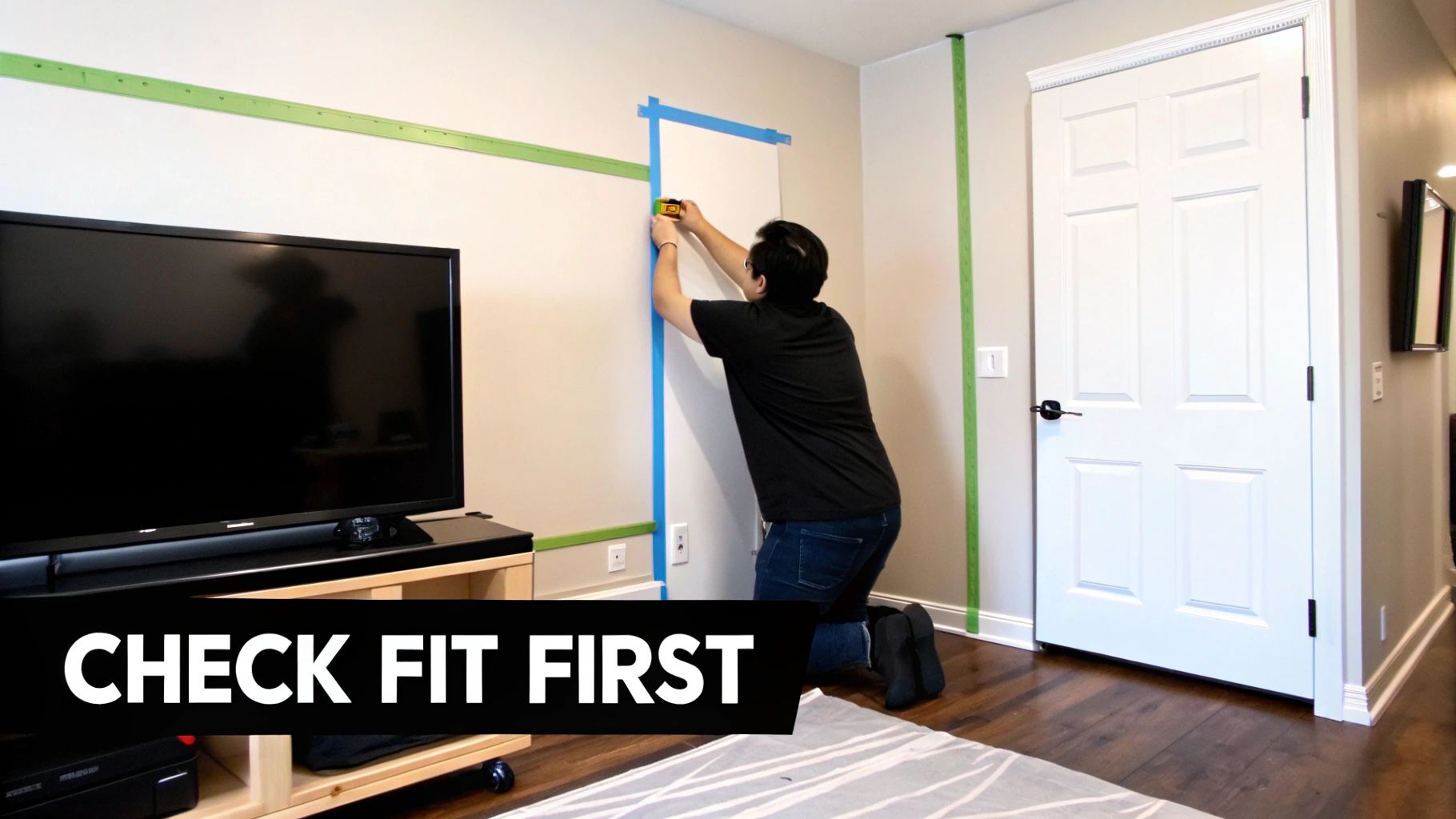
The diagonal measurement gets you in the ballpark, but the real-world logistics of your space are what really matter. A TV that’s even a half-inch too wide for its spot can throw your entire setup into chaos. This is where you need to stop thinking about the screen and start thinking about the room.
Your first move is to measure the actual width and height of the space where the TV will live. If it’s going into a media center or a built-in alcove, this step is absolutely non-negotiable. With your TV’s exact dimensions in hand, you can then start looking for furniture. For some great ideas, check out this guide to choosing an entertainment unit to find something that fits both your TV and your room's style.
Here's one of the best pro tips I can offer to avoid a serious case of buyer's remorse: see the TV's footprint before it ever arrives. Just grab some painter's tape and your tape measure. Then, using the TV's total width and height (bezel included), mark out a to-scale rectangle right on your wall.
This simple trick is incredibly powerful for two reasons:
This little visualization exercise takes you from abstract numbers to a tangible sense of the TV's presence in your home. It’s the closest you can get to a "try before you buy" experience and is a crucial part of measuring for your specific environment.
A snug, perfect fit might look clean, but remember that electronics need room to breathe. TVs generate a fair amount of heat, and without proper airflow, their internal components can overheat. This can shorten the lifespan of your brand-new investment. As a general rule, try to leave at least 2-3 inches of open space on all sides and above the TV for ventilation.
Finally, think about the TV's journey from the delivery truck to your living room. You need to measure the width of your doorways, hallways, and any tight corners on the path. The TV will arrive in a box that is significantly larger than the unit itself. It’s a heartbreaking—and surprisingly common—scenario when someone has the perfect TV that they simply can't get inside the house.
A few quick measurements beforehand can prevent a logistical nightmare on delivery day. These same principles of planning are essential for much larger installations, such as those detailed in our resources on digital outdoor signage.
Knowing your TV's physical footprint is only half the battle. Now it’s time to connect those measurements to the most important thing: your actual viewing experience.
The whole point is to get an immersive picture that fills your field of view without being pixelated or overwhelming. Getting this right is what turns a simple TV purchase into a genuine home theater experience. It’s the difference between just watching a movie and feeling like you’re in it.
A few simple rules of thumb can help you find that sweet spot, which depends on both the screen size and its resolution. For modern 4K TVs—which are pretty much the standard now—the calculation is surprisingly straightforward.
A great starting point is to multiply the TV's diagonal screen size by a factor of 1 to 1.5. This range gives you a comfortable distance where the picture is sharp, clear, and totally immersive.
For a 65-inch TV:
For an 85-inch TV:
Sit too close to a massive 4K screen, and it might feel like you're in the front row of a movie theater—a little too intense. Sit too far back, and you lose all the incredible detail you paid for. The goal is to find that perfect balance for your room and your personal comfort.
Just as critical as distance is the height at which you mount or place your TV. Honestly, putting a TV too high is one of the most common installation mistakes people make, and it’s a one-way ticket to neck strain.
The perfect height isn't a fixed number; it's entirely relative to where you sit.
As a rule, the center of the TV screen should be at eye level when you're seated in your main viewing spot. This creates a natural, comfortable sightline so you're not craning your neck up or looking down.
The easiest way to figure this out is to sit down on your couch, get comfortable, and have someone measure the distance from the floor to your eyes. That measurement is your target for the dead center of the screen.
These ergonomic principles also extend to your desk setup, where finding your ideal monitor distance for eye comfort is just as critical for daily use. Applying these ideas ensures your setup isn't just visually stunning, but also physically comfortable for those long movie marathons or gaming sessions. It's a small detail that makes a world of difference.
Even with the best instructions, a few tricky situations always seem to pop up. Let's tackle some of the most common measurement head-scratchers so you can move forward with total confidence.
This one seems complicated, but it’s actually pretty straightforward. You're still after that diagonal measurement, you just have to account for the curve.
Grab a flexible tape measure—the kind a tailor uses is perfect. Start at the top corner of the actual screen (not the bezel) and let the tape follow the screen's gentle curve all the way to the opposite bottom corner. The key here is to measure the screen's surface. Don't pull the tape tight in a straight line from corner to corner, or you'll get a measurement that's way too short.
Great question. The answer completely depends on where you’re putting the TV.
Always think about the final placement. For a tabletop setup, the stand is a critical part of the TV's footprint. For a wall mount, it's just a spare part you'll be storing in a closet. Getting this right saves a lot of headaches later.
So you carefully measured your screen and got 64.5 inches, but the box proudly says it's a 65-inch TV. Did you get the wrong one? Almost certainly not.
This happens all the time. For marketing, manufacturers often round the diagonal measurement up to the nearest clean number. A difference of half an inch or so is completely normal and just an industry quirk. As long as your number is super close to the advertised size, you're good to go. It’s also exactly why we take the time to measure the actual width and height—those are the numbers that really matter for a perfect fit.
At Smart LED Inc., we believe precision is the key to an amazing visual experience, whether you're choosing a home theater screen or a massive commercial video wall. Our factory-direct approach ensures you get the best technology without the middleman markup. Explore our high-impact visual solutions at https://smartledinc.com.
Picture this: you take the flash and spectacle of a Times Square billboard, slap it on the back of a truck, and send it wherever
A wall of TV screens is exactly what it sounds like: a big, impressive display made by tiling multiple TVs together so they act like

Picking the right displays for shows can feel like a high-stakes guessing game. Get it right, and you create an immersive world that captivates your
"*" indicates required fields