
Uncategorized
Digital Billboard Truck: Boost Your Campaign with Mobile Ads
Picture this: you take the flash and spectacle of a Times Square billboard, slap it on the back of a truck, and send it wherever

Before you even think about giant screens and earth-shaking subwoofers, let's talk about the single most important part of your home theater: the room itself. Getting this part right is the bedrock of your entire project. It's the difference between a good system and a truly mind-blowing cinematic experience.
Think of the room as the canvas. You can buy the best paints in the world, but if your canvas is warped and dirty, the masterpiece will never happen. Nail the fundamentals of the space first, and every piece of gear you add later will perform at its absolute peak.
The whole idea of creating a dedicated cinema at home isn't niche anymore. It's a massive trend. The global home theater market is exploding, projected to hit USD 23.52 billion by 2033. People are serious about this, investing in experiences that rival the local multiplex, and it all starts with picking the right spot.
The best rooms for a home theater are the ones that give you a head start on control—specifically, control over light and sound. Think spare bedrooms, finished basements, or that bonus room over the garage. These spots are often naturally isolated from the high-traffic areas of your home.
One pro tip: try to avoid a perfect square. Square rooms are notorious for creating nasty audio issues called "standing waves," where bass frequencies can either get overwhelmingly boomy or disappear entirely in certain spots. A rectangle gives you a much better acoustic starting point.
When you're scouting locations, keep these things in mind:
Before you start knocking down walls, it’s a good idea to plan your home renovation to make sure the project stays organized and on track from day one.
Here’s a hard truth: a room’s acoustics will make or break your expensive sound system. You can have the best speakers in the world, but in an empty room with hardwood floors and bare drywall, they’ll sound echoey, harsh, and muddled. Sound waves bounce off those hard surfaces, creating a mess of reflections that makes dialogue hard to understand.
The goal isn't a completely "dead," silent room like a recording booth. It's about controlling the reflections to achieve a sound that's clear, dynamic, and enveloping, not muffled or flat.
Your first line of defense is actually the stuff you're putting in the room anyway. A thick area rug, some heavy curtains over any windows, and plush, fabric-covered seating will absorb a surprising amount of sound.
For the next level of control, strategically placed acoustic panels on the walls (especially at the "first reflection points" between you and the front speakers) will work wonders. And don't forget the corners! Bass traps are essential for taming low-frequency rumble and keeping the bass tight and punchy instead of boomy.
This is the one thing almost everyone forgets until it’s too late: power. High-performance AV gear is thirsty, and it’s sensitive. A big power amplifier or a couple of beefy subwoofers can draw a serious amount of electricity.
Plugging a $20,000 system into the same circuit that runs your vacuum cleaner is just asking for trouble. You’ll risk tripping breakers, introducing audible hums and buzzes into your audio, and potentially even damaging your expensive components.
The professional approach is to have an electrician install at least one dedicated 20-amp circuit that runs only to your home theater. This ensures your system gets a clean, stable supply of power, protecting your investment and letting it perform without any electrical hiccups. If you're considering a massive LED video wall, this becomes even more critical; our guide on how to buy an LED sign dives deeper into these power considerations.
Alright, let's talk about the heart of your home theater: the display. This is where the magic happens, and the choice you make here will define every movie night from here on out. It's no longer just about picking the biggest screen you can find. The real decision today is between two incredible technologies: the classic, high-performance projector setup and the newer, game-changing direct-view LED video wall.
Each one offers a totally different kind of experience. A projector and screen can give you that colossal, truly cinematic image size that just fills your vision. But—and this is a big but—its performance lives and dies by how dark you can get the room. Any bit of stray light will wash out the picture, killing the contrast and vibrancy. For a dedicated, blacked-out theater room, it's still a fantastic way to go.
Then you have direct-view LED video walls. These are emissive displays, meaning the screen itself creates the light. This simple fact makes them an absolute beast for multi-purpose rooms. They can punch through ambient light with mind-blowing brightness and contrast, giving you a vivid, powerful image even if your room isn't a pitch-black cave.
When you start shopping, you're going to get hit with a tidal wave of technical jargon. Let's cut through the noise and focus on what really impacts the picture quality you'll see.
Resolution (4K vs. 8K): This is just the pixel count. While 8K technically has four times the pixels of 4K, you'd be hard-pressed to see the difference from a normal viewing distance in most home theaters. Honestly, a high-quality 4K display is more than enough for an incredible picture and gives you the best bang for your buck.
Contrast Ratio: This is huge. It’s the difference between the absolute brightest white and the deepest, darkest black the display can create. A high contrast ratio is what gives an image its punch and sense of depth. This is where LED video walls really shine, since individual pixels can shut off completely to produce true, inky blacks that projectors can only dream of.
Pixel Pitch: This term is specific to LED walls. It’s the distance from the center of one pixel to the center of the next. A smaller pixel pitch (like 1.2mm) means the pixels are packed tighter together. The result is a smoother, more detailed image that looks razor-sharp even when you're sitting closer.
One of the single biggest wins for modern LED tech is the death of the bezel. Unlike old-school video walls made by slapping a bunch of TVs together, a seamless LED display is one massive, uninterrupted canvas. It pulls you right into the action without any distracting grid lines.
This little decision tree can help you figure out what kind of space you're working with, which is the first step in choosing your display tech.
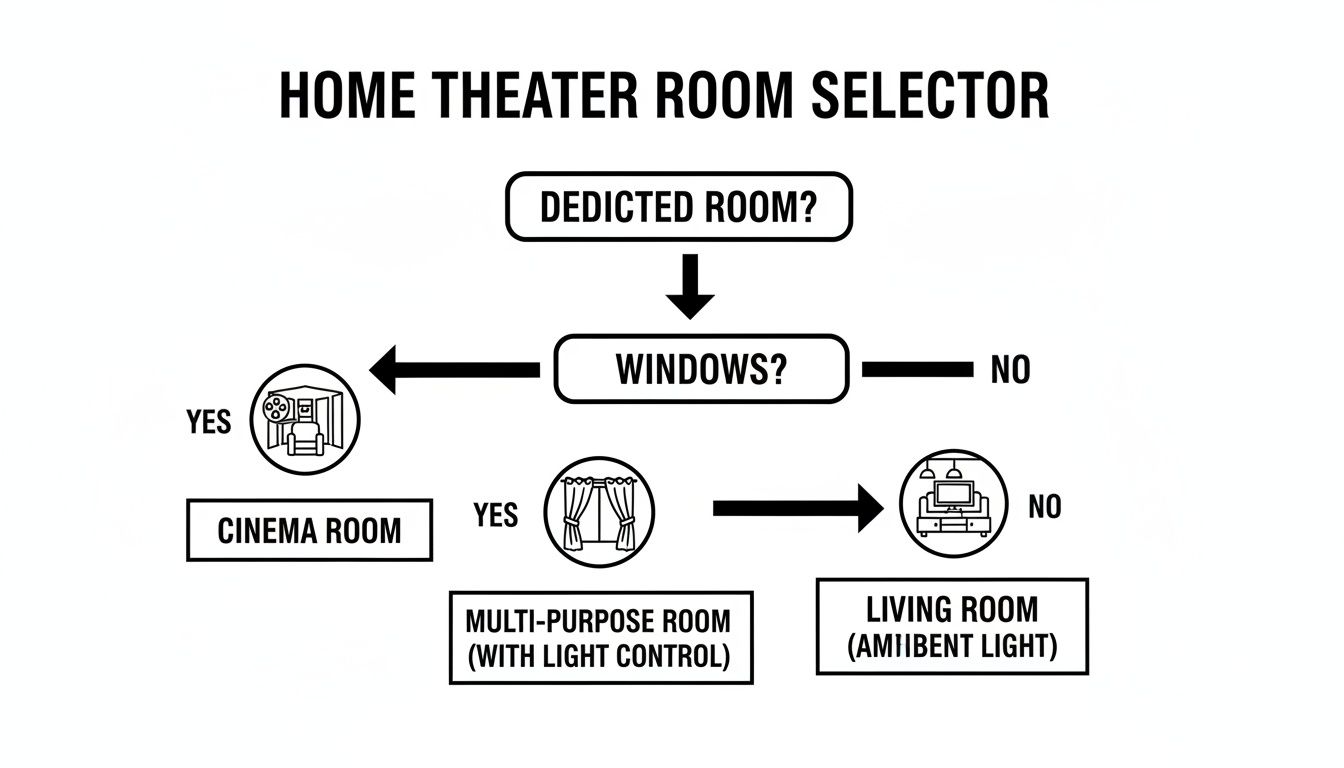
As you can see, it really boils down to whether you have a dedicated, dark room or a multi-use space with windows. That one factor will guide your entire home theater design.
To make this crystal clear, let's put the two technologies side-by-side. This table breaks down what really matters when you're learning how to build a home theater, from performance to longevity.
| Feature | Projector and Screen | LED Video Wall (Smart LED) |
|---|---|---|
| Best Environment | Dedicated, light-controlled dark rooms | Multi-purpose rooms with ambient light |
| Brightness & Contrast | Good to excellent, but totally dependent on darkness | Exceptional brightness and absolute black levels |
| Image Quality | Can get easily washed out by ambient light | Vibrant and punchy in pretty much any lighting condition |
| Lifespan | 2,000-5,000 hours before a bulb replacement is needed | 80,000-100,000 hours with no replacements required |
| Installation | Demands precise alignment and careful mounting | Modular panels assemble into a single, seamless display |
| Cost | Generally a lower initial cost for huge sizes | Higher initial investment, but a much longer lifespan |
So, what's the final verdict? It really comes down to your room and your priorities.
If you have a dedicated "bat cave" and your goal is the absolute largest screen for your budget, a projector is a very strong contender. But for a modern living room or a flexible media space where you just can't kill all the lights, an LED video wall is hands-down the superior choice. It delivers uncompromising performance, incredible longevity, and a truly seamless, next-generation viewing experience that projectors just can't match in those conditions.
If you're intrigued by the possibilities, you can dive deeper into the technology behind Smart LED indoor LED wall panels and see for yourself how they're redefining what home cinema can be.
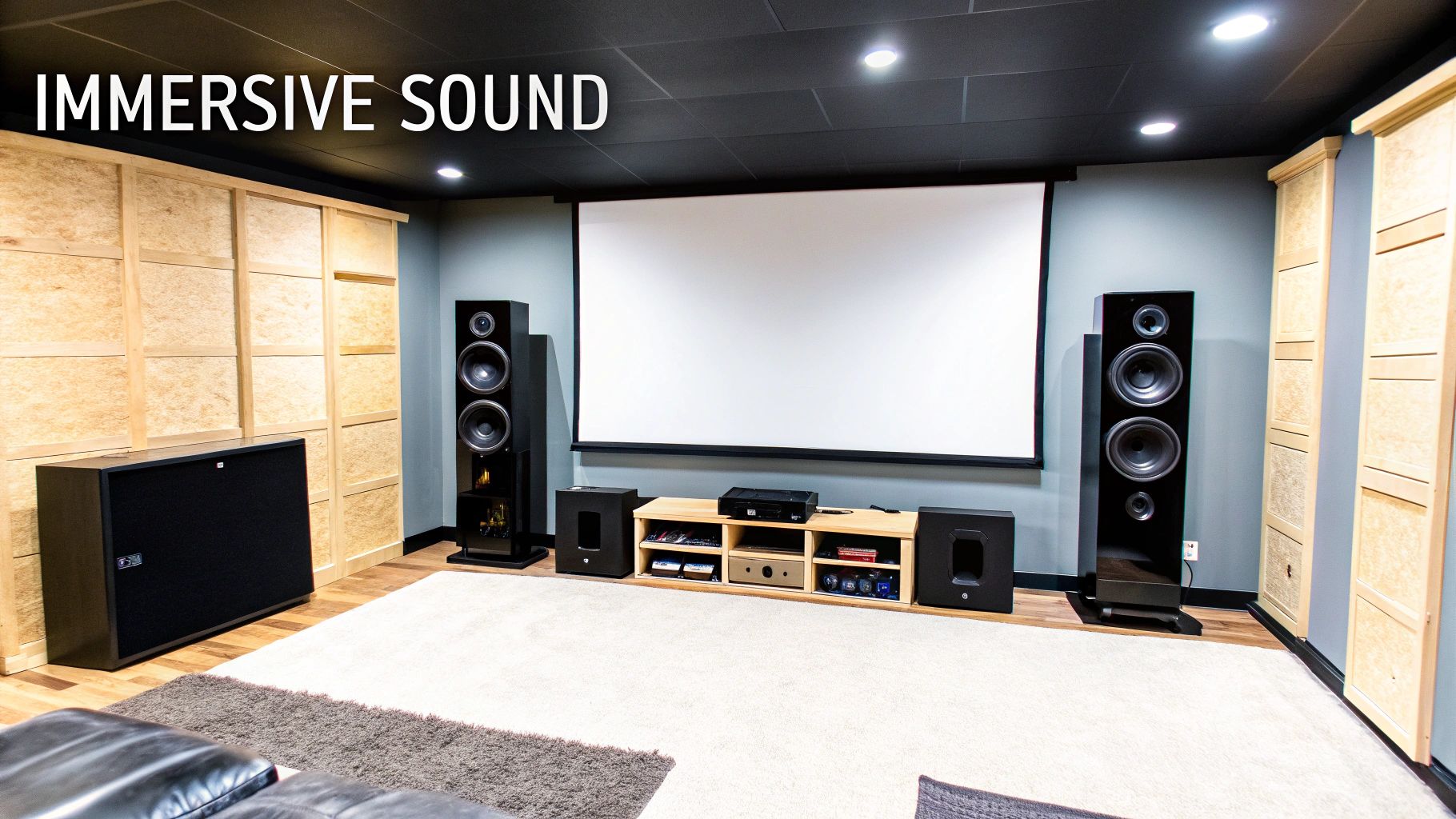
A stunning picture is only half the equation. The moments that truly give you goosebumps—the subtle rustle of leaves behind you, a bullet ricocheting off the wall to your left, the chest-thumping roar of a spaceship overhead—are all born from incredible sound.
Designing your soundscape is about creating a three-dimensional bubble of audio that completely pulls you into the story. It's more than just buying speakers; it's about strategy.
The magic behind modern home theater audio comes from object-based surround sound formats, primarily Dolby Atmos and DTS:X. Old-school systems just assigned sounds to specific speakers. These new formats treat sounds as individual "objects" that can be placed and moved anywhere in 3D space. This is exactly how they make a helicopter sound like it’s flying directly over your head.
You'll see speaker configurations described with numbers like 5.1, 7.1, or the much more exciting 7.1.4. This notation isn't nearly as intimidating as it looks once you know the code.
A 5.1.2 setup (five surrounds, one sub, two height channels) is a brilliant starting point for true 3D audio. If you have the space and budget, a 7.2.4 system can deliver a truly mind-blowing, reference-level experience.
Your theater will need a team of speakers, each with a specific role. While soundbars are popular for their simplicity, a proper component system offers vastly superior quality and control. The market is definitely reflecting this, with more people seeking out these advanced setups. If you're curious about the industry trends, you can explore detailed insights on the home theater market from Technavio.
Here’s a look at the key players on your audio team:
Pro Tip: Try to stick with the same brand and series for your front three speakers (left, center, right). This is called "timbre matching," and it ensures that as sound pans across the screen, it sounds completely seamless and natural.
Where you put your speakers matters just as much as which ones you buy. The goal is to create a perfectly balanced sound field that converges on your main seating position—the "money seat." Your AV receiver’s manual will have diagrams, but a good rule of thumb is to form an equilateral triangle between your seat and the front left and right speakers.
But even with perfect placement, the room itself can fight you. Hard surfaces like bare floors and drywall create nasty echoes and reflections that make your audio sound harsh and muddy. Luckily, a few acoustic treatments can work wonders.
By carefully planning your speaker layout and adding some basic acoustic treatments, you ensure every explosion lands with force and every whisper of dialogue is crystal clear. You'll be hearing the movie exactly as the filmmakers intended.
All the world-class gear you've picked out doesn't mean a thing if it can't all talk to each other perfectly. The unsung hero of any high-performance home theater is a clean, logical wiring plan. Nailing this part of the build saves you from a world of troubleshooting headaches down the road and is the key to unlocking your system's true potential.
Your AV (Audio/Video) receiver is the central nervous system of this whole operation. Think of it as the traffic controller for your entire theater. Every source—your 4K Blu-ray player, that new gaming console, or a media streamer—plugs right into the receiver's HDMI inputs. The receiver then does the heavy lifting, processing both audio and video, sending a perfect picture to your display and the right sound to every single speaker.
Let's get one thing straight: not all cables are created equal, and this is especially true for HDMI. If you're running a modern 4K or 8K display with HDR (High Dynamic Range), using certified Ultra High Speed HDMI cables is completely non-negotiable. These are the only cables with the 48 Gbps bandwidth needed to reliably handle the massive data streams required for high-resolution, high-frame-rate video with brilliant color.
Skimping on cables is a classic mistake that leads to all sorts of frustrating glitches, like:
The same logic applies to your speakers. Investing in quality speaker wire makes a real, audible difference. A good 12 or 14-gauge oxygen-free copper (OFC) wire is an excellent choice for most setups. It ensures a clean, powerful signal travels from your receiver's amplifier to each speaker without getting degraded along the way.
A tangled mess of wires behind your equipment rack is more than just an eyesore—it's a nightmare waiting to happen when you need to troubleshoot or upgrade. The goal here is a professional, clutter-free setup that’s as slick behind the scenes as it is on the screen.
A clean installation isn't just about aesthetics; it's about reliability and serviceability. When you can easily identify and access every connection, you save yourself hours of future headaches.
To get that pro look, use a combination of tools. Wall plates with dedicated HDMI and speaker connections keep things tidy. Flexible conduit is fantastic for running wires inside walls, and simple cable ties or sleeves can bundle everything neatly behind your media cabinet. For really complex systems with massive displays, a high-quality video processor can be a lifesaver by centralizing all your connections. For example, a studio-grade LED video processor can become the central hub of your entire visual experience.
The final touch for a truly seamless theater is unifying all the controls. Juggling five different remotes just to watch a movie is the exact opposite of a luxury experience. This is where a good universal remote or a full smart home integration system shines.
Modern control systems can be programmed with a "Movie" scene. With a single button press, the display and AV receiver power on, the system switches to the right input, and the lights slowly dim. For the ultimate automated setup, integrating smart lighting control systems is a must. It transforms your theater into an effortless, high-tech sanctuary where the technology just disappears, leaving you with nothing but pure, cinematic immersion.
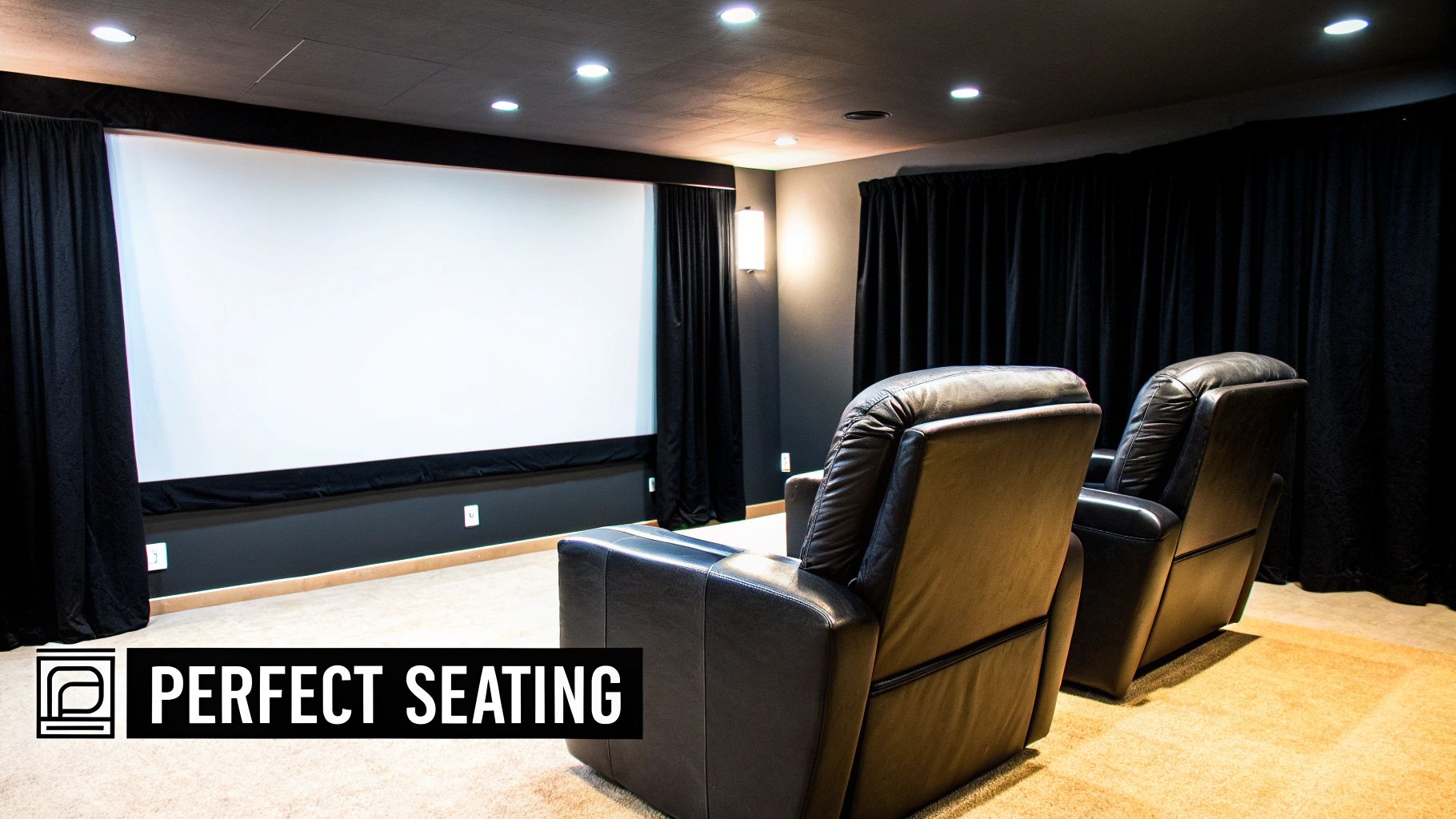
You’ve dialed in the picture and perfected the soundscape. Now it’s time for the elements that truly transform a room with great gear into a genuine home cinema. Seating and lighting are the final, critical details that dictate comfort, immersion, and the overall feel of your space.
The right seating is about so much more than just a place to sit; it’s a core component of the viewing experience. While those classic, dedicated leather recliners with cupholders are iconic for a purpose-built theater, don't feel locked into that style. A large, comfortable chaise lounge or a deep sectional can be just as inviting, especially if you're building a multi-use media room.
The real key is to prioritize long-term comfort. You’ll be spending hours in these seats, so look for quality construction and solid ergonomic support. Trust me, comfort is what separates a theater you show off from one you and your family will actually use night after night.
Positioning your seating is a bit of a science, and it directly impacts both what you see and what you hear. Placing your seats in the primary listening position—what we call the "sweet spot"—ensures you get a balanced, immersive soundstage where every speaker channel arrives at your ears at precisely the right time.
For the video, the goal is to fill your field of view without causing eye strain. A good rule of thumb is to place your main seating row at a distance where the screen occupies about 30 to 40 degrees of your horizontal field of view. This pulls you into the picture without forcing your eyes to scan back and forth just to keep up with the action.
Here’s a quick reference for optimal viewing distances:
If you’re planning multiple rows, you absolutely need to build a riser for the back row. A simple platform, just 12 to 18 inches high, is usually all it takes to give everyone an unobstructed view of the screen. Every seat becomes a great seat.
Lighting is one of the most powerful—and often overlooked—tools for setting a mood. A well-designed lighting plan elevates the experience from just watching a movie to attending a screening. The secret is to use a layered approach with full dimming control.
Great lighting in a home theater isn't about brightness; it's about control. Your goal is to eliminate screen reflections and create an ambiance that helps the screen itself feel brighter and more vibrant by contrast.
First things first: you have to get complete control over external light. Blackout curtains or shades are non-negotiable for any room with windows. Once you’ve achieved total darkness, you can start building your lighting scene from the ground up.
A professional-feeling home theater uses three distinct types of lighting, and all of them should be controlled by smart dimmers to create the perfect atmosphere.
By integrating these smart, dimmable LED lights, you can program a "Movie" scene that slowly fades the lights as the film begins. It’s these final touches that complete the illusion, making every movie night feel like a special event.
You’ve done the hard work—the planning, the building, the wiring. But your home theater isn't truly finished until you've tuned it up. Calibration is that final, critical step that takes your system from "good enough" to absolutely breathtaking, ensuring the picture and sound you get are exactly what the creators intended.
Think of it like tuning a high-performance car. Your display and speakers arrive with factory settings designed to grab your attention in a brightly lit showroom, not to deliver accuracy in a dark, dedicated theater space. Without proper calibration, you're leaving a huge amount of performance on the table.
The good news? This fine-tuning process isn't just for professional installers with thousands of dollars in specialized gear. With the tools already built into your equipment and a bit of guidance, you can achieve some truly dramatic improvements that will make every movie night feel like a premiere.
That "Vivid" or "Dynamic" picture mode on your display might look punchy at first glance, but it's often wildly inaccurate. Colors are oversaturated, and crucial shadow detail gets completely crushed. Your very first move should be to switch the picture mode to "Cinema," "Filmmaker," or "Calibrated." This one simple change will instantly get you much, much closer to an accurate image.
From there, you'll want to dial in the core settings using a calibration disc or by streaming test patterns. These patterns give you objective references to get everything just right.
Calibration isn’t about making the picture "pop" in some subjective way. It's about achieving accuracy—reproducing the image exactly as it was mastered in the studio so you see the film through the director's eyes.
Just like your room's layout and surfaces affect what you see, they have a massive impact on what you hear. Every room is different, and those differences can create peaks and nulls in the sound. Luckily, modern AV receivers come with powerful room correction software that automates most of the audio calibration for you.
This software uses a small microphone (usually included in the box) that you place at your main listening position. It then analyzes your room's unique acoustic signature by measuring how sound from each speaker bounces off your walls, floor, and ceiling.
You'll find several common systems built-in, depending on your receiver's brand:
Once you kick off the process, your receiver will play a series of chirps and test tones through each speaker. It listens, measures, and then automatically adjusts speaker levels, crossover frequencies, and applies equalization (EQ) to smooth out your room's acoustic bumps and dips.
The difference is night and day. You'll notice a massive improvement in dialogue clarity, a more cohesive and balanced soundstage, and bass that is tight and impactful instead of boomy. This is the final step that ties everything together, delivering the precise, high-fidelity experience you set out to build.
Of course. Here is the rewritten section, crafted to sound like an experienced human expert.
When you start down the path of building a dedicated home theater, a few big questions always pop up first. It's completely normal. Let's walk through some of the most common things people ask when they're planning their dream setup.
The "how much" question is always the first one, isn't it? Honestly, the budget can be all over the map. You could pull together a really solid, entry-level system for a few thousand dollars, or you could go all out with a completely custom cinema that runs into six figures. The biggest slices of your budget pie will almost always be the display, the audio system, and the seating.
Next up is the room itself. While you can make almost any space work with enough effort, some rooms are just natural-born theaters. Ideally, you want a rectangular room with as few windows as possible—this gives you way better control over light and sound.
Basements and unused spare rooms are prime candidates for a reason. One word of caution: try to steer clear of perfectly square rooms. They're notorious for creating nasty acoustic problems that are a real headache to solve.
For rooms that can't be made perfectly dark, an LED video wall is a game-changer. It delivers a level of brightness and contrast that projectors just can't compete with when there's ambient light. Plus, they last a lot longer and you'll never have to worry about replacing a bulb.
If you're looking for a seamless, high-performance visual centerpiece that looks incredible in any room, check out the custom home theater solutions from Smart LED Inc. at https://smartledinc.com.
Picture this: you take the flash and spectacle of a Times Square billboard, slap it on the back of a truck, and send it wherever
A wall of TV screens is exactly what it sounds like: a big, impressive display made by tiling multiple TVs together so they act like

Picking the right displays for shows can feel like a high-stakes guessing game. Get it right, and you create an immersive world that captivates your
"*" indicates required fields