
Uncategorized
Digital Billboard Truck: Boost Your Campaign with Mobile Ads
Picture this: you take the flash and spectacle of a Times Square billboard, slap it on the back of a truck, and send it wherever
Let’s cut to the chase: 4K is all about pixel quantity (sharpness and detail), while High Dynamic Range (HDR) is all about pixel quality (color, brightness, and contrast). They aren't the same thing, but they are designed to work together to create a truly stunning visual experience.
It’s easy to get these two terms mixed up. Since most modern displays now boast both 4K and HDR, many people assume they’re just different flavors of the same feature. But in reality, they tackle two completely separate aspects of what makes a picture look great.

Here's an analogy: think of building a house. 4K gives you a massive foundation with more room to build in intricate details. HDR is the high-quality paint, the realistic lighting, and the rich textures that make the house actually look real. One provides the structure; the other brings it to life.
The real distinction is in what each technology actually improves. 4K, also known as Ultra HD, is purely a resolution standard. It’s defined by a specific pixel count: 3840 x 2160. That’s a huge number of pixels—four times more than 1080p Full HD—which results in incredibly sharp lines and fine detail.
HDR, on the other hand, has nothing to do with resolution. It’s a technology that dramatically expands a display's ability to show a wider range of brightness and color. You get whites that are genuinely brilliant, blacks that are truly deep, and a whole spectrum of colors that are much closer to what our eyes see in the real world. This is especially critical for digital outdoor signage, which has to look vibrant even when competing with direct sunlight.
In short: 4K adds more pixels to the screen. HDR makes each of those pixels better.
To make this crystal clear, the table below breaks down what each technology brings to the table, helping you see their individual roles in creating the final image.
| Feature | 4K (Ultra HD) | High Dynamic Range (HDR) |
|---|---|---|
| Primary Goal | Increase pixel count for image sharpness and clarity. | Expand the range of brightness, contrast, and color. |
| What It Measures | The quantity of pixels (3840 x 2160). | The quality of each pixel's light and color output. |
| Visual Impact | Sharper edges, finer textures, and more detailed images. | More vibrant colors, brighter highlights, and deeper blacks. |
| Key Metric | Resolution (Pixel Count) | Dynamic Range (Brightness & Contrast Ratio) |
Ultimately, while 4K provides the crisp canvas, HDR is what paints the breathtaking, lifelike picture on it.
When we talk about image quality, it’s easy to get lost in the jargon. Let's start with the basics: resolution. The term 4K, which you’ll often hear used alongside Ultra High Definition (UHD), boils down to one simple thing: the number of pixels on the screen. Specifically, it means a display with a resolution of 3840 x 2160 pixels.
That might just sound like a bunch of numbers, but it’s a big deal. A 4K screen packs in over eight million individual pixels—that's a staggering four times the detail of a standard 1080p Full HD display. It’s this massive jump in pixel count that gives 4K its signature sharpness and lifelike clarity.

So, what do those eight million pixels actually mean for you? It means seeing the world on screen with incredible detail. You can make out the fine stitching on a character’s jacket, count the individual blades of grass on a sports field, or read the crisp text on a digital menu board. It’s the difference between looking at a picture and feeling like you’re looking through a window.
This level of detail creates a sense of depth that makes everything feel more immersive and three-dimensional. For businesses, this isn't just a nice-to-have; it delivers real-world results:
The real magic of 4K is its ability to render incredibly fine details without any of that fuzzy pixelation you see on lower-resolution screens. The result is a smoother, more realistic, and far more captivating visual experience.
But here’s the catch: the impact of 4K is all about context. Two factors are absolutely critical—screen size and how far away you are. Your eyes can only perceive so much detail from a certain distance. If you’re sitting across the room from a small 4K screen, you honestly might not notice the difference between it and a 1080p display. Your eyes simply can't resolve all those extra pixels.
On the other hand, get up close to a massive screen, and the difference is night and day. This is especially true for large-format displays like the 163" 4K Direct-View LED Video Wall, where viewers are often just a few feet away and can truly appreciate that incredible pixel density. While 4K might be overkill for a billboard seen from a highway, it’s absolutely essential for a premium indoor video wall.
While 4K has become the standard for high-end displays, the conversation is shifting. Smart buyers are now looking beyond just resolution. Things like HDR capability, peak brightness, and color gamut are becoming just as important. The key takeaway is that 4K is a crucial piece of the puzzle, but it’s just one part of what makes a truly stunning image.
While 4K resolution adds millions of pixels to a display, High Dynamic Range (HDR) makes every single one of those pixels work harder. It's not about sharpness—it's about a dramatic leap forward in pixel performance. HDR is the magic that makes an image pop with lifelike vibrancy, depth, and realism.
Frankly, many people find the jump from a standard display to an HDR display is a more noticeable and impactful upgrade than the move from 1080p to 4K. It fundamentally changes how light and color are rendered, creating a picture that gets much closer to what our eyes see in the real world. This is all about improving three core parts of pixel quality.
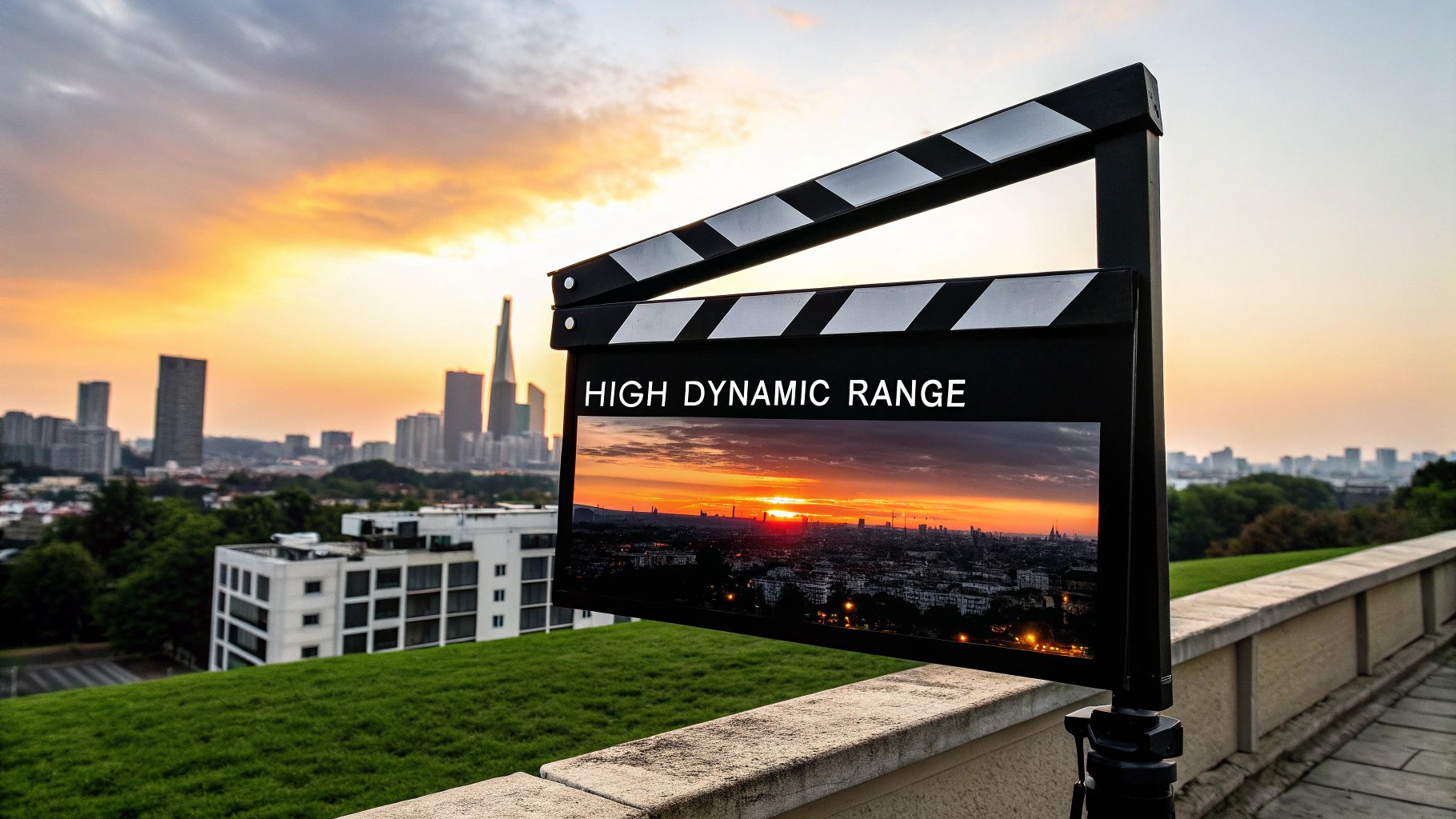
HDR’s visual punch comes from boosting specific aspects of the image that resolution alone can’t touch. These elements work together to create a far more believable and immersive picture.
The move to High Dynamic Range has picked up serious speed in recent years. By 2024, roughly 75% of new TV models released included at least one HDR format, which tells you a lot about what customers now expect. People are increasingly valuing contrast and color, not just pixel count, because HDR elevates the perceived image quality without touching the resolution. You can find more insights on the growth of the HDR market on industryresearch.biz.
This is exactly why the "high dynamic range vs 4k" conversation matters so much. While 4K gives you the sharp canvas, HDR provides the vibrant, lifelike paint. A top-tier image needs both, but the immediate "wow" factor of HDR is often more profound. Of course, processing all this advanced visual data requires serious hardware. For professional setups, a studio-grade LED video processor is non-negotiable for properly managing the increased color depth and luminance information that HDR content demands.
The ultimate goal of HDR is to close the gap between what a camera captures and what your eyes can see. It recreates light and color with a fidelity that makes the on-screen world feel tangible.
To really get to the bottom of the 4K vs. HDR debate, we have to look past the marketing buzzwords and pop the hood. Both technologies promise a better picture, but they get there by tackling completely different technical challenges. Understanding what makes them tick is the key to choosing the right display, whether it's for your living room or a massive digital sign.
The fundamental distinction is surprisingly simple. Think of 4K as being all about the quantity of pixels on a screen—it gives you more building blocks to construct a sharper image. HDR, on the other hand, is all about the quality of those pixels, making each one brighter, more colorful, and far more dynamic.
This is where it all starts. A 4K display is defined by its resolution: 3840 x 2160 pixels. That adds up to over eight million tiny dots of light, a density that creates razor-sharp lines, crystal-clear text, and intricate detail. It’s a huge advantage in situations where you’re sitting close to the screen and precision matters.
But HDR isn't measured in pixels at all. It’s a suite of technologies designed to make each individual pixel work harder. It’s about making the light and color pouring out of that pixel feel more true to life, which often creates a much more dramatic and noticeable improvement than resolution alone.
4K gives you more pixels. HDR makes each of those pixels perform better. If you remember one thing from this comparison, make it this.
This separation is critical. You can have a 4K screen without HDR support, giving you a sharp but potentially flat and lifeless image. You could also have a 1080p display that supports HDR—a less common combo these days—which would deliver stunning color and contrast despite having fewer pixels.
One of HDR's most powerful weapons is its command over brightness, which we measure in nits. Your typical standard dynamic range (SDR) display might top out around 100-300 nits of peak brightness. That's fine for everyday viewing, but it just doesn't have the horsepower to produce truly brilliant highlights or cut through a brightly lit room.
HDR changes the entire game. An HDR-ready display can hit peak brightness levels of 600, 1,000, or even 4,000 nits and beyond. That massive leap allows for spectacular highlights—like the glint of sun off a car bumper or the flash of an explosion—that look startlingly realistic and give the image a profound sense of depth.
For outdoor LED signs, this isn't just a nice-to-have feature; high nit values are absolutely essential for a sign to stay visible and punchy under direct sunlight.
Color is another battlefield where HDR completely dominates. It achieves this through two key specs: color gamut and bit depth.
Color Gamut: Standard displays operate within a color space called Rec. 709, which only covers a fraction of the colors the human eye can actually perceive. HDR displays break free from that limitation, using much larger color gamuts like DCI-P3 or the even wider Rec. 2020. This unlocks billions of additional shades for richer, more saturated, and truer-to-life color.
Bit Depth: This spec determines how many shades are available for each primary color. SDR is typically 8-bit, which provides about 16.7 million total colors. This sounds like a lot, but it can lead to "color banding," where you see ugly, distinct stripes in smooth gradients like a sunset. HDR steps up to 10-bit (or even 12-bit) color, delivering over 1 billion colors and creating perfectly smooth, seamless gradations.
Not all HDR is created equal. The information that tells the display how to handle all this extra brightness and color is delivered via metadata, and different formats use this data in different ways. The three you'll run into most often are HDR10, Dolby Vision, and HLG.
| HDR Format | Metadata Type | Key Characteristic |
|---|---|---|
| HDR10 | Static | This is the open, royalty-free standard. It sets a single brightness and color profile for the entire movie or show. |
| Dolby Vision | Dynamic | A proprietary format that uses dynamic metadata to adjust brightness and color scene-by-scene or even frame-by-frame. |
| HLG (Hybrid Log Gamma) | No Metadata | Developed for live TV, it combines SDR and HDR into one signal, making it backward-compatible with older, non-HDR displays. |
While HDR10 is the universal baseline you’ll find everywhere, premium formats like Dolby Vision offer a visibly superior experience by fine-tuning the picture in real-time. It’s clear from the specs: 4K provides the sharp canvas, but HDR is what supplies the vibrant, dynamic, and lifelike paint.
Knowing the technical specs of 4K versus HDR is one thing, but making the right call when it’s time to buy is where it really counts. There’s no single "best" choice—it all boils down to how and where you’re going to use the display. Forget a generic pros and cons list; let's dive into real-world scenarios to see which technology should be your priority.
Context is everything. A feature that creates a mind-blowing movie night in a dark home theater could be totally useless on a digital sign baking in the afternoon sun. By looking at the application first, we can get past the spec sheet and focus on what will actually make an impact on your audience.
When you’re setting up an outdoor digital sign, your number one enemy is ambient light. It doesn’t matter if it’s a bright, overcast day or direct sunlight—your message has to cut through the glare. In this fight, HDR and its ability to pump out serious brightness is non-negotiable.
Frankly, a 4K resolution billboard that people see from a hundred feet away is overkill. The human eye simply can’t make out that level of detail from that distance. What people can see, however, is an HDR-capable sign with a high nit rating—we’re talking 2,000 nits or more—that stays vibrant and readable no matter what. The boosted contrast and richer colors of HDR make ads pop, grabbing attention way more effectively than a sharper image that gets washed out.
For any outdoor display, put your money on HDR and peak brightness. A message people can see in standard definition is infinitely better than an invisible one in 4K.
Indoor video walls in places like corporate lobbies, retail stores, or event venues play by a different set of rules. Here, viewing distances are much closer, and you have control over the lighting. This is the perfect environment for 4K and HDR to work together to create a truly premium experience.
4K resolution makes sure that fine text, detailed logos, and sharp product photos stay crisp and clean, even for people standing just a few feet away. At the same time, HDR delivers the visual punch that makes content feel dynamic and alive. The deep blacks, brilliant highlights, and saturated colors create a sense of depth that pulls the viewer in, turning a simple screen into a captivating focal point.
Ideally, you want both. But if the budget forces you to choose, let the content be your guide:
In a controlled home theater, the whole point is to get as close to a real cinema experience as you can. And while 4K gives you the sharpness we all expect now, HDR is arguably the more transformative technology for movie lovers.
Filmmakers are masters of using light and shadow to set a mood and guide your attention. HDR’s incredible contrast ratio lets a display show you those scenes exactly as intended. You see the subtle, menacing glint in a villain’s eye in a dark room or feel the heat from a dazzling explosion—all with a realism that standard displays just can't touch. The wider color gamut also means the director's carefully chosen color palette comes through perfectly.
While 4K is the modern standard, the leap in immersion from a well-implemented HDR system is often far more dramatic and instantly noticeable. It’s the difference between just watching a movie and feeling like you’re right there in it.
For mission-critical environments like a command center or data analysis hub, clarity and precision are everything. Operators have to spot tiny details on complex maps, read fine print from dozens of data feeds, and monitor high-res video streams all at once.
In this scenario, 4K resolution is the undisputed champion. The sheer pixel density of a 4K display lets you cram an enormous amount of information onto the screen without it becoming an illegible mess. It allows operators to see more and react faster. While HDR can help make color-coded data stand out, its cinematic strengths are less important than the raw, uncompromised detail that 4K delivers. Here, a sharp image ensures no critical piece of information gets lost in a blur of pixels.
Deciding between high dynamic range and 4K can feel like a technical puzzle, but the right answer always comes back to your specific goals. This isn't about which technology is "better" in a vacuum, but which one delivers the most bang for your buck in your specific application. While the ideal solution often includes both, budget or logistics sometimes force a choice. That’s when prioritizing becomes critical.
A clear decision-making framework helps cut through the noise. Are you fighting direct sunlight or crafting an intimate cinematic experience? Is your audience just feet away or clear across a parking lot? Answering these simple questions will point you toward the right investment, guaranteeing your display makes the impact you’re paying for.
This decision tree breaks down how to prioritize 4K or HDR based on where your display will live—whether it's for outdoor signage, an indoor video wall, or a home theater.
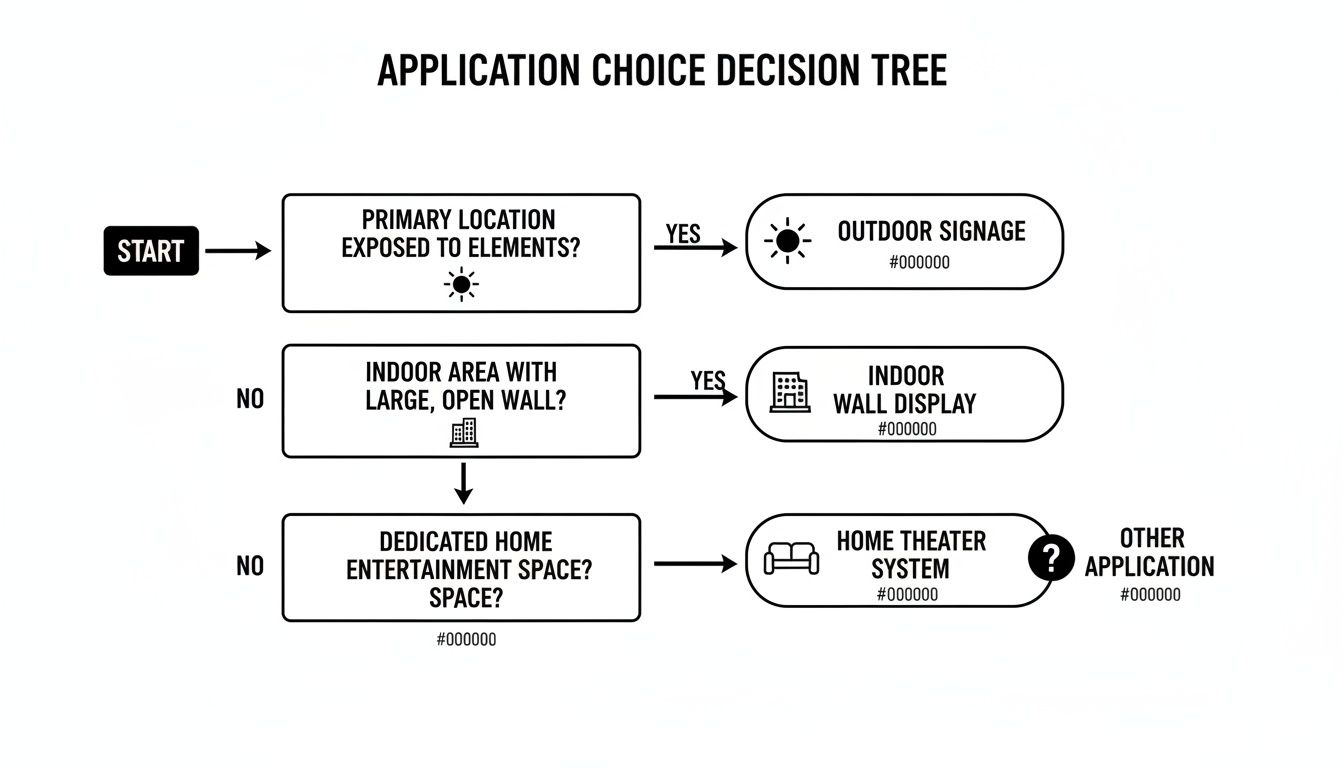
As you can see, outdoor applications almost always demand HDR's raw brightness to be seen, while close-up indoor uses get more value from the crisp detail of 4K.
When you're ready to pull the trigger, run through this quick checklist. It’s a simple way to systematically evaluate your needs and confidently select an LED display that lines up with your content, environment, and budget.
Making the right choice also means looking at the numbers. When you start comparing the value of an HDR-first display versus a 4K-first one, some clear trade-offs emerge. Industry estimates place the price premium for HDR-enabled displays anywhere from 10% to 40% above a standard 4K model of the same size.
But here's the interesting part: viewer impact studies often show that HDR content delivers a bigger subjective jump in quality than resolution increases alone. For projects like outdoor billboards or immersive indoor walls, your return on investment is often better spent on higher peak brightness and HDR processing than on cramming in more pixels that no one will see from 50 feet away. You can find more insights on the global 4K and HDR display market on dataintelo.com.
The takeaway is clear: Prioritize 4K where fine detail is paramount for a close audience. Prioritize HDR and high brightness where visibility and visual punch are needed to overcome distance and ambient light.
Even after you get the basics down, a few common questions always seem to pop up when people are trying to decide between high dynamic range and 4K. Let's clear up some of the most frequent points of confusion so you can feel confident about your next display investment.
These are the practical, real-world answers you need, covering everything from hardware to content formats.
Yes, you absolutely can. Think of it this way: HDR is about pixel quality (better color and brightness), while resolution is about pixel quantity. The two are completely separate technologies.
While the market has mostly bundled them together, making "4K HDR" the default standard, you can still find some 1080p (Full HD) displays that support HDR. This combination can deliver a huge visual upgrade over a standard 1080p SDR screen because you get that incredible contrast and pop of color without needing the extra pixels of 4K. That said, finding a brand-new 1080p HDR display is getting tougher as most manufacturers have shifted their focus to the 4K market.
The key takeaway is that the technologies are independent. HDR makes pixels better, regardless of how many there are.
You do. A complete HDR ecosystem is non-negotiable if you want to see the benefits. Just buying an HDR-capable screen isn't enough—if you play standard (SDR) content on it, you won't magically get an HDR image.
To get the full experience, you need three pieces of the puzzle working in harmony:
These are the two heavyweights in the HDR world, and the main difference is how they handle the image data. HDR10 is the open, royalty-free standard, which means any manufacturer can use it without paying a license fee. It relies on static metadata, which sets a single brightness and color profile for the entire movie or show.
Dolby Vision, on the other hand, is a more advanced, proprietary format that requires certified hardware and licensing fees. Its secret weapon is dynamic metadata, which allows it to fine-tune brightness, contrast, and color on a scene-by-scene or even frame-by-frame basis. This almost always results in a more precisely optimized and superior picture, but it comes at a premium.
This one’s easy. For virtually every outdoor LED sign, HDR is vastly more important than 4K. Why? The single biggest enemy of an outdoor display is the sun.
HDR's ability to pump out incredibly high peak brightness levels (measured in nits) is what allows a sign to stay visible and punchy, even in direct sunlight. Given that people are usually viewing billboards and digital signage from a distance, the hyper-detailed resolution of 4K is often completely lost on the human eye. It’s an expensive feature that adds little to no real-world value in this context.
Ready to put the power of HDR and 4K to work for your own project? At Smart LED Inc., we provide factory-direct outdoor signs and indoor video walls that deliver stunning visual impact. Explore our solutions at https://smartledinc.com and let our experts help you design the perfect display for your needs.
Picture this: you take the flash and spectacle of a Times Square billboard, slap it on the back of a truck, and send it wherever

A wall of TV screens is exactly what it sounds like: a big, impressive display made by tiling multiple TVs together so they act like

Picking the right displays for shows can feel like a high-stakes guessing game. Get it right, and you create an immersive world that captivates your
"*" indicates required fields