Wie man die Gewinne, die Sie erzielen von online Spielautomaten maximiert Die Regeln des Casino-Betriebs und Bedingungen für Online-Spielautomaten. Der Zweck dieser Regeln ist es,

Picking the right displays for shows can feel like a high-stakes guessing game. Get it right, and you create an immersive world that captivates your audience. Get it wrong, and the entire experience can fall flat. This guide is here to give you a clear, practical framework to make sure you get it right every single time.
Making the right call begins with asking the right questions. It's easy to get lost in a sea of technical specs, but the real starting point is defining what your event actually needs. A massive LED video wall for an outdoor music festival and a high-definition monitor for an intimate trade show booth are playing two completely different sports.
The secret is to anchor your decision to four critical factors: the venue, the audience, the content, and your budget. Each one of these will heavily influence which technology will deliver the biggest impact and the best return. Think of it less as a technical puzzle and more as a strategic mission to match the perfect tool to the job.
To cut through the noise, think about how each factor narrows down your options. For instance, a bright, sun-drenched outdoor venue immediately knocks standard projectors out of the running, pointing you straight toward high-brightness LED displays. On the other hand, a dark theater with seating far from the stage makes large-scale projection a smart, cost-effective solution.
The decision tree below maps out how these simple questions guide you toward the ideal display.
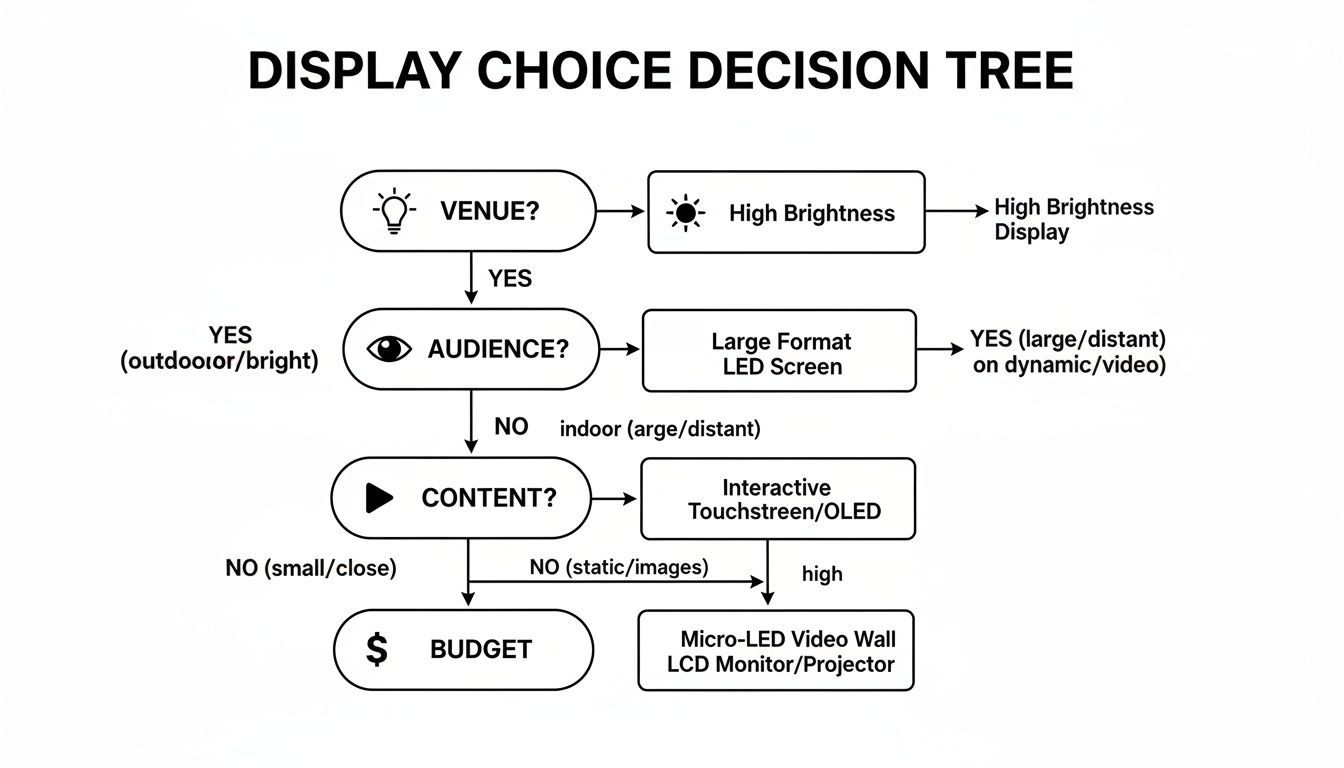
As you can see, your final choice isn’t about finding a single "best" technology—it's the result of a few practical considerations. By starting with your environment and working your way through to your budget, you can systematically filter out what won’t work and zero in on the displays that are guaranteed to make your show a success. This approach turns uncertainty into a confident, informed decision that makes your event unforgettable.
When you're choosing a display for a show, you're really picking between three core technologies. Each one is a specialist, built to shine in a specific environment. The trick isn't finding the "best" technology overall, but the best one for your stage, your audience, and your message.
Think of it like choosing a vehicle. You wouldn’t take a sports car off-roading, and a cargo van isn't your first choice for a scenic road trip. In the same way, knowing the real-world strengths of Direct View LED, Projection, and Large-Format Displays means you’ll have the right engine to power your visual experience. Let's break down the main players.
Direct View LED (DVLED) is the undisputed champion of brightness and raw visual punch. It’s built from thousands of tiny, individual light sources—the LEDs—mounted directly onto modular panels. Because they're modular, you can click them together to build a completely seamless digital canvas of almost any size or shape you can imagine, with no distracting borders or bezels.
This design is what makes DVLED walls so incredibly bright. They can easily overpower direct sunlight, making them the only real choice for outdoor daytime events like music festivals or open-air corporate gatherings. Their jaw-dropping contrast and vibrant colors also make them a go-to for high-energy indoor shows—think concert stages, broadcast studios, and major trade show exhibits where you absolutely have to stand out from the crowd.
The demand for these screens is exploding. The global LED display market was valued at USD 7.76 billion and is expected to climb to USD 11.04 billion by 2032, driven by huge demand in advertising and large-scale venues. You can find more details on this growth over at intelmarketresearch.com.
Projection is exactly what it sounds like: a system that casts an image from a projector onto a separate surface, like a screen or a wall. This is the technology you turn to when you want to create massive, cinematic-style visuals inside a controlled space where you can kill the lights. It’s the workhorse of dark theaters, conference ballrooms, and breakout rooms.
The biggest draw for projection is its incredible cost-effectiveness at a massive scale. Throwing a 20-foot-wide image is worlds cheaper with a projector than it is with an LED wall. But its reliance on reflected light is also its Achilles' heel.
Key Takeaway: Projection is a battle between the projector's light and the room's ambient light. If the ambient light wins, your image will look washed out and faint. Success with projection is all about light control.
For this reason, projection is a non-starter in any space with sunlight pouring in or bright house lighting that you can’t dim or switch off completely.
Large-format displays are basically high-end, oversized TVs, usually using LCD or OLED technology. You’ve seen them everywhere—as digital signage in retail stores, interactive kiosks at trade shows, or as the confidence monitors facing the stage so a speaker can see their notes.
Their real strength is delivering razor-sharp detail up close. Since they have a fixed, high resolution in a standard format (like 4K or 1080p), they’re perfect for showing detailed text, complex graphics, or high-fidelity video to a small group of people standing right in front of them. If you're curious about this kind of application, check out our guide on how LED signs for businesses can be a powerful tool.
The trade-off? They're limited by their fixed size and the visible bezels (the screen's border) that appear when you try to tile them together into a larger "video wall." While this setup can be effective, a multi-screen array will never have the truly seamless, continuous look of a DVLED wall.
To help you visualize the best fit, here’s a quick rundown of how these technologies stack up against each other.
| Technology | Best For | Key Advantage | Key Limitation |
|---|---|---|---|
| Direct View LED | Outdoor events, concerts, bright trade shows | Extreme brightness and seamless modular design | Higher cost and lower resolution at close distances |
| Projection | Dark theaters, ballrooms, controlled settings | Cost-effective for massive image sizes | Poor performance in any ambient light |
| Large-Format Display | Interactive kiosks, small booths, detailed presentations | Excellent close-up detail and sharpness | Limited scalability and visible bezels in arrays |
Ultimately, each of these display types is a powerful tool. The key is matching the right tool to the job to ensure your vision comes across loud and clear.
Staring at a technical spec sheet for a display can feel like trying to read a foreign language. It's a wall of acronyms and numbers that, frankly, seem designed to confuse. But here’s the good news: you only need to get a handle on a handful of key metrics to make a great decision. These are the specs that directly shape what your audience actually sees and experiences.
Think of it like buying a camera. A pro photographer might get lost in the weeds talking about sensor size and dynamic range, but most of us just want to know if it takes sharp, clear pictures. We're going to apply that same practical mindset to displays for shows, cutting through the jargon to focus on what creates a real visual impact.
If you learn one term, make it pixel pitch. This is probably the single most important spec for an LED display because it determines the screen's sharpness and how close someone can stand before the image starts to look blocky. It’s simply the distance, in millimeters, from the center of one pixel to the center of the next.
A smaller number means the pixels are packed tighter together, which creates a denser, higher-resolution image. Think of it like a high-definition photo versus a pixelated one; the closer the dots, the smoother the picture.
Choosing the right pixel pitch is a classic balancing act between visual clarity and your budget. A finer pitch looks incredible up close, but that quality definitely comes at a premium.
Brightness, measured in nits, dictates how well your display can punch through the existing light in its environment. To put it in perspective, one nit is about the same amount of light produced by a single candle. That sounds tiny, but modern displays can pump out thousands of them.
Ever tried to see your phone screen in direct, blazing sunlight? You have to crank the brightness all the way up just to make it usable. The exact same principle applies here.
A Quick Guide to Brightness Levels:
- Indoor Venues (ballrooms, theaters): You'll typically need 500-1,500 nits. Any more than that, and you risk blinding your audience in a dark room.
- Bright Indoor Spaces (trade show floors, lobbies with windows): Plan for around 1,500-2,500 nits to keep the image vibrant.
- Outdoor (Shaded or Overcast): You need at least 2,500-4,500 nits to cut through the daylight.
- Outdoor (Direct Sunlight): Go big or go home. You’ll need 5,000+ nits to produce a clear, punchy image. For a deeper dive into outdoor specs, our guide on digital outdoor signage is a great resource.
Getting the brightness wrong is one of the most common—and costly—mistakes you can make. An underpowered outdoor screen is a washed-out, invisible mess, while an overly bright indoor screen is a recipe for eye fatigue.
While pixel pitch determines a screen's potential for sharpness, resolution is the total pixel count on its surface, usually written as width by height (like 1920×1080). The aspect ratio is just the relationship between that width and height (like 16:9).
Here's why this matters: your content and your screen must be on the same page. If you create a video in a standard 16:9 widescreen format but try to play it on a custom, ultra-wide 21:9 screen, you’re in for a bad time. The image will either be stretched and distorted or have those ugly black bars on the sides.
It is absolutely crucial to lock in your final display dimensions before a single piece of content gets made. This guarantees your visuals are perfectly tailored to the digital canvas you’ve built, giving you that polished, professional look everyone wants.
The demand for this technology is skyrocketing. The global LED video display market recently saw shipments of 408,000 square meters, generating a staggering USD 1.3 billion in revenue. This growth is being driven by corporate and educational venues where custom aspect ratios and high resolutions are quickly becoming the new standard. You can find more market insights and the trends in fine pixel pitch demand over at Omdia.
A spectacular display is more than just a bright screen; its real magic comes from how it’s woven into the physical space. The most brilliant visuals can fall completely flat without a rock-solid plan for staging, rigging, and installation. This is where the digital canvas meets the real world, and where safety, logistics, and creativity have to work in perfect harmony.
Thinking about installation from day one isn't just a good idea—it's non-negotiable. It shapes everything from your budget to your creative freedom. When setting up displays for shows, there are really two main ways to do it: building from the ground up or suspending from above. Each has its own playbook and engineering demands.
The most direct approach is ground stacking. It's exactly what it sounds like: building the display panel by panel right from the stage or another solid, level base. Technicians assemble a support structure first, then meticulously stack and lock the modular panels into place until the full screen is complete.
This method is usually faster and requires less heavy-duty structural engineering than flying a screen, making it a go-to for indoor events, trade show booths, or any venue that just doesn't have overhead rigging points. But it’s not without its own set of challenges. The ground support system has to be perfectly stable and engineered to handle the display's total weight, which can easily be thousands of pounds.
Safety First: A ground-stacked wall is, for all intents and purposes, a massive, heavy, vertical structure. It absolutely must be properly braced and weighted to eliminate any risk of tipping, especially where people will be walking nearby. Always, always work with certified technicians who live and breathe the physics involved.
For a cleaner, more polished look or in spots where floor space is gold, flying the display is the way to go. This means suspending the screen from an overhead truss system using specialized rigging hardware and chain motors. What you get is a slick, floating screen that feels completely integrated into the overall stage design.
But make no mistake, flying a display is a serious engineering task. It starts with a structural assessment of the venue itself—can the ceiling or support beams actually handle the load? Every single component, from the motors and cables to the tiny rigging points on each panel, has to be rated to support the total weight with a massive safety margin. This is a job strictly for certified and experienced rigging pros. No exceptions.
Beyond the physical structure, you have to nail down the logistical backbone of your display: power and signal. A big LED wall is a power-hungry beast; you can't just plug it into a standard wall outlet and hope for the best.
Once you’ve got the technical and safety logistics locked down, the fun begins. Modern displays aren't just flat rectangles anymore; they are dynamic, architectural set pieces. It's time to think beyond the basic backdrop and start imagining how the display can shape the entire audience experience.
You could use curved LED panels to create immersive, wraparound visuals that literally pull the audience into the scene. Transparent displays can create stunning, holographic-like effects, letting you see performers or products through the on-screen content. You can even turn the stage itself into part of the show with dynamic LED floors.
And while you're choosing the right screens, don't forget how other visual elements work with them to create memorable events. Great professional stage lighting equipment, for example, works in concert with your video wall to build a complete, immersive visual world. By pairing a solid technical plan with bold creative ambition, your display becomes more than just a screen—it becomes an unforgettable centerpiece.
So, you need a stunning screen for your show. Now comes one of the biggest forks in the road: do you rent or buy your displays for shows? This isn't just about the upfront cost. It’s a strategic decision that really boils down to how often you'll use it, your hunger for the latest tech, and whether you have the crew to handle it long-term.
Get this right, and you’ll get the absolute best bang for your buck.
For one-off events, touring roadshows, or that big annual conference, renting is almost always the way to go. It gives you access to pristine, cutting-edge gear without the massive price tag or the logistical nightmare of storing and maintaining it.
On the flip side, buying becomes a no-brainer for permanent or semi-permanent setups. Think corporate headquarters, houses of worship, or venues that use the same display configuration day in and day out. Ownership gives you total control and can save you a lot of money over several years of heavy use.
Renting is all about flexibility and staying on the bleeding edge. The display world moves fast, and renting means you’re never stuck with last year’s model. It’s the perfect solution for event producers who need a very specific screen size or pixel pitch for a single, high-stakes show.
Here’s why renting often makes the most sense:
It's crucial to factor these costs into your overall financial plan. This guide on budgeting for an event is a great resource for seeing the bigger picture.
If you're leaning toward buying, you have to look past the sticker price and dig into the Total Cost of Ownership (TCO). This is where the hidden costs live, and ignoring them is a recipe for a budget disaster. The purchase price is just the tip of the iceberg.
TCO is the real long-term cost of a display. It’s not just the hardware—it's every single expense you'll face over its entire lifespan, from maintenance and repairs to staffing and software updates.
Tallying up these ongoing expenses gives you a much more realistic view of your investment. And it's more important than ever, with the global LED market projected to hit a staggering USD 278.7 billion by 2035. That kind of growth means technology will keep advancing, which directly impacts the long-term value and upkeep needs of any screen you buy today.
Think through these TCO factors before you sign a check:
By thinking through these questions, you can make a smart choice that lines up with both your creative goals and your bottom line. For a deeper dive into how these systems are priced, our guide on outdoor LED sign cost offers some valuable insights.
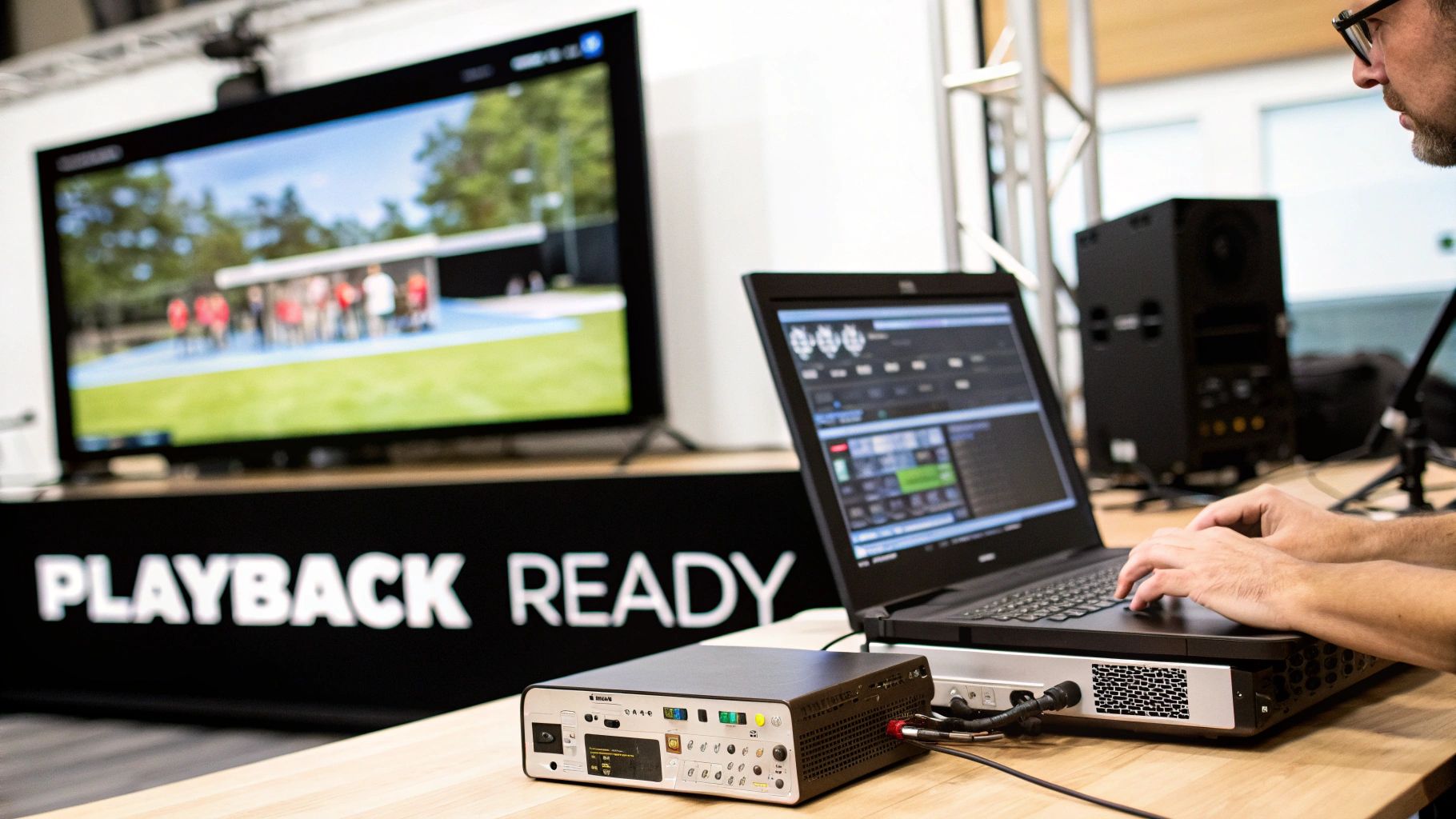
Even the most dazzling, high-tech screen is just an expensive black rectangle without great content and a rock-solid way to get it there. This is where the magic happens, where your vision finally hits the screen. Nailing your content and playback workflow is what separates a breathtaking visual experience from a technical glitch.
It all starts with creating visuals that are built for your specific display. One of the most common and painful mistakes we see is when someone designs content in a standard 16:9 format and then tries to shoehorn it onto a custom-sized screen. The result? Stretched, squashed, or awkwardly letterboxed graphics that just scream amateur hour. Always, always confirm the exact pixel resolution and aspect ratio of your display before you create a single piece of content.
Once your content is perfectly tailored to the screen, you need the right gear to drive it. The complexity of your event will dictate the hardware you need, and the options range from dead simple to mind-blowingly powerful.
Finding the right hardware is really a balancing act between capability and simplicity.
Think of a media server as the conductor of a visual orchestra. It cues every piece of content at the perfect moment, keeps every screen in perfect harmony, and lets you make changes on the fly. It's the secret weapon behind any dynamic live production.
Tucked between your playback source and the LED wall is a critical piece of hardware: the video processor or scaler. Its job is to act as a universal translator for your video signals. It takes whatever you send it—from a laptop, camera, or media server—and formats it perfectly for the unique pixel layout of your specific LED wall.
A processor handles a few vital tasks that you never notice when they're done right, but are glaringly obvious when they go wrong. It manages brightness and color calibration across all the individual panels, making sure the entire screen looks like one seamless, unified canvas. It also scales the video signal to match the display’s native resolution, which prevents distortion and gives you the sharpest, clearest image possible.
Without a properly configured processor, even the most beautiful content can end up looking jagged, discolored, or just plain wrong on screen. Your workflow simply isn't complete without one.
When you're getting down to the final details, a few last-minute questions always pop up. We hear them all the time from event planners and technical directors who are aiming for a show that runs without a hitch. Below are some straightforward answers to the most common queries we get, designed to help you sidestep common mistakes and lock in your decisions with confidence.
Think of this as your pre-flight checklist. Getting these details sorted out early prevents those dreaded on-site surprises and ensures your production looks polished and professional.
This is a great question, and the answer comes down to one key spec: pixel pitch. The smaller the pitch, the closer people can be. A good rule of thumb is that for every 1mm of pixel pitch, the minimum comfortable viewing distance is about 3 feet (or 1 meter). Any closer, and the human eye starts to pick out the individual LED pixels, which shatters the illusion of a solid, crisp image.
Let's break it down with real-world examples:
Hands down, the most common pitfall is getting fixated on price or resolution while completely ignoring the event's environment. It's the classic mistake of choosing a tool before you truly understand the job it needs to do.
The smartest way to choose a display is to start with your environment—the lighting conditions, audience distance, and the type of content you're showing—and let those factors dictate the tech specs you actually need.
For example, I've seen people try to use a standard indoor display for a daytime outdoor event. The result? A washed-out, barely visible image because the screen simply wasn't bright enough to compete with the sun. On the flip side, paying a premium for a razor-sharp 4K display when your audience is 100 feet back is a total waste of money. They won't see the difference.
A lot more than you probably think. Large LED video walls are power-hungry beasts; you absolutely cannot just plug them into a standard wall outlet. The total power draw depends on the screen's size, its brightness setting, and the pixel density.
You will almost always need dedicated, high-amperage circuits or a separate power distribution unit (we call it a "distro") to run them safely. It is absolutely critical to talk about power needs with your display provider and the venue's certified electrician early in the planning stage. They can calculate the total load and make sure you have a safe, stable, and sufficient power supply on show day.
At Smart LED Inc., we take the guesswork out of choosing the perfect display. From massive outdoor stages to intimate corporate lobbies, our factory-direct video walls deliver stunning visuals backed by expert support. Ready to make your next show unforgettable? Explore our solutions at https://smartledinc.com.
Wie man die Gewinne, die Sie erzielen von online Spielautomaten maximiert Die Regeln des Casino-Betriebs und Bedingungen für Online-Spielautomaten. Der Zweck dieser Regeln ist es,
If you have a pet dog that supplies you with emotional assistance, you might be interested in getting an Emotional Support Animal (ESA) letter. This
Wie man Ihre Gewinne maximiert bei Online-Spielautomaten maximiert Spielautomaten online haben Regeln und Bedingungen programmiert denen von Casinos integriert werden. Diese Regeln sind so konzipiert
"*" indicates required fields
We have sent a 6-digit verification code to your email. Please enter it below to continue.